Showing posts with label BLOG. Show all posts

Saturday, 4 May 2013

Blogging for Beginners: Tips for Starting Your Blog


Starting a blog is no longer enough. 
Start your own blog
There are millions of blogs out there, and most of them get nowhere because they don’t have a strategy in place.
In this post, you’ll not only learn blogging for beginners, but you’ll get 17 concrete steps you can take to dramatically increase your chances of success.
It doesn’t matter if you haven’t started a blog yet, or if you’re a veteran, because just one of these tips can make a big difference in your life and in your blogging.
With that said, let’s start with the first tip.

Saturday, 13 April 2013

Top 10 Tips to Sell Your Website or Blog on Flippa


If you are planning to buy or sell a website, you probably already heard about Flippa. It is the largest online marketplace for websites. Most people who list a website for sale there, however, end up selling it for peanuts (e.g., $100), or not selling at all.
How come? Most of the times the seller didn’t do his homework. If you want to maximize your chances of selling (and your profit), the 10 tips below will help you.

Are You Familiar with HTML and CSS? Reasons Why You Should be.

I have always wanted to create my own design for my blog. In my opinion, being able to work with the code of a blog is a huge advantage that many bloggers choose not to pursue. Aside form the design aspect of creating an attractive blog, being able to work with the coding will allow you to make changes and adjustments to your blog any time you want, rather than relying on a professional to do it for you, or rather than just limiting yourself to what’s available with the theme you have chosen.

Most blogs need a bit of customization from time-to-time, and for someone who has no experience with HTML or CSS this be a bit intimidating. However, if you’re working with WordPress you really only need a basic knowledge in order to make many of the customizations that you would like, and you don’t even need to know PHP in most cases (those who aren’t comfortable with PHP just need to be able to recognize it and avoid it when making changes to the HTML).

Sunday, 31 March 2013

How to choose your domain name?


With dozens or even hundreds of domain search sites available, you can easily waste hours exploring all of them.
How to choose your domain name?
Domain Selection
Instead of casting a wide net, do a targeted search based on your project.
Building an affiliate or AdSense site? Use a keyword-based domain site.
Creating a new business or blog? Find a memorable, brandable domain.
Below are the best domain search sites for any purpose.

Saturday, 9 March 2013

Why blogging is incredibly Awesome


I was surfing through the web last night and I found this blog post which clearly describes the awesomeness of blogging. So, here I have it for you.
The previous post dealt with some of the hidden challenges of blogging.  Now it’s time to get super positive, and discuss why blogging is incredibly awesome.  Blogging entails a great amount of work, but with that you get back a myriad of worthwhile experiences.
Blogging is Amazing
Hitting Publish
The act of hitting “Publish” is simple in itself, but the work accomplished to be in that position always tastes sweet.  Each post you publish has some background and a story.  Putting the words and pictures together to bring it home and share with the internet is extremely satisfying.  There is always a sensation of accomplishment and relief.  I usually take a walk around the room to enjoy them moment before the promotion begins.
Providing Value
Providing value to your readers should be a leading reason to create content.  It’s a huge part of what every blog should be about.  Share your experiences and knowledge.  Make it clear, and your readers will come back. Most readers are just looking for a valuable takeaway.  If every reader exits your blog with something new then you’ve done your job.  The immediate payoff of praise is usually found in your comments and tweets.
Connecting
Connecting with people from all over the world is arguably number one.  Between blogging and social media the amount of people that you can build relationships with is daunting. Google Hangouts and Skyping (should be a word) with people from India, Australia, Japan, Philippines and countries you can barely pronounce.  Very few outside of this space have had the good fortune of this experience.  You can’t put a price on it.  Listen, nothing beats meeting someone in person.  However, technology has made this possible, and blogging is the catalyst.  Yes, they were all extremely fortunate to connect with some guy from New Jersey.  Smile.
Always Learning
You can spend 24 hours a day for the remainder of your life and not know it all. This holds true even if you’re an expert, guru, or ninja.  There isn’t much that is static.  Blogging itself is always evolving.  SEO which is a spoke in the blogging wheel seems to change almost daily.  Social Media, another spoke, continues to grow at incredible levels and each network has its own quirks and idiosyncrasies.   Putting this all together is ongoing challenge that can never be mastered.  The learning never stops.
Opportunities
As your blog grows you may land on the map.  Time and consistent solid content generation can lead to opportunity.  There are writing opportunities out there, both paid and free.  Consulting, contract work, speaking engagements, and book publishing are some of the opportunities that have found bloggers.
Money
There is so much for free on the internet that we’ve become somewhat tainted.  Even talking about generating income directly or indirectly from your blog is taboo in some circles.  Well, you can make money through your blog.  It’s not simple, but it can be done.  Now you may not make $40K or $50K per month like powerhouses Pat Flynn and John Chow, but there are plenty of ways to generate income.  Generating income includes: Adsense, selling advertising on your site, affiliates, writing gigs, E-Books, or your own products.  That just scratches the surface.

This list could have been closer to 50, but I didn’t want this piece to be bookmarked.  If you blog, we loved to hear why you find blogging to be so awesome.  If you found this to be of value, please share with one of the networks below.

from geeklesstech.com

Monday, 18 February 2013

How to add META tags to your blog (Increase SEO)

If you don't know what meta tags are, and the importance of adding meta tags, here is the detailed article on how to add them to your blogger(blogspot) blogs or any website.

Adding meta tags is very important if you want to get some good traffic from search engines like google,yahoo,msn,etc,especially the meta description part is the most important one.

If you don't know what meta tags are,Meta tags are the tags which describes your site and tells the search engines what your site is all about. Adding meta tags is an important factor in Organic Search Engine Optimization (SEO). Meta tags allows search engines to index your web pages more accurately. In other words,Meta tags communicate with the search engines and tells more information about your site and make your webpages index correctly and accurately.

Here is an example. This is what I got when I typed 'Techoyo' in the Google Search Engine. 

Wednesday, 13 February 2013

Tweak title tag in blogspot for better SEO

Title tag SEO
Are you a blogspot blogger? In order to increase your blog's visibility to the search engines, you need to have keywords in the title. (That is SEO basics)
In this tutorial I'm going to tell you how to do this in your blogspot blog.


Tuesday, 12 February 2013

Check Your External Links with This Tool


Incoming links (i.e., links from other websites pointing to your own) usually cannot hurt your search rankings, even if they come from spammy websites. This is because Google knows you can’t control those links.
Outgoing links, however, can get you in trouble, because you are in direct control. If you link to malicious or spammy websites, Google might put a red flag on your website and reduce your search rankings temporarily, until it figures what is going on. This why links on blog comments have the nofollow tag by default.
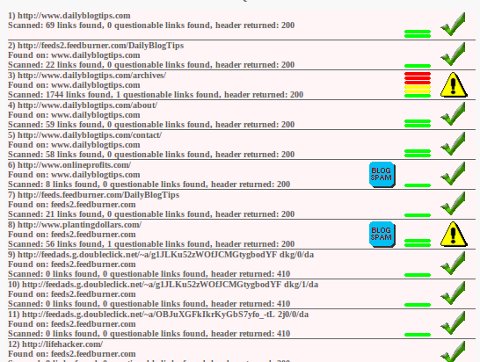
Sometimes if you link to a website that links to malicious or spam content you can also get in trouble, so it’s a good idea to keep an eye on the sites you are linking to. One tool you can use for this purpose is called Text Link Checker.
Incoming links checker SEO

You just need to insert a URL (i.e., the homepage of the website where you want to analyze the external links), and the tool will start crawling all the links, up to three levels in depth if I am not wrong. After that it will build a little report with icons highlighting dangerous links.
Obviously you should use this tool only as a starting point of your analysis, because there are many false alarms. It’s a useful thing to have on your tool-belt, though, so check it out.

Thursday, 24 January 2013

8 Steps to Building a Strong and Fulfilling Blog


1. Build Content that is interesting and attracts eyeballs. It should generate comments and conversation. Ask for feedback and don’t be afraid to be controversial. Keep writing every day, even when you think no one is reading it. This is paramount to a successful blog/site.
2. Track your traffic. Seems elementary, but do you do it? Google Analytics is great for tracking traffic and free. It will also give you a mental boost to know that people are visiting even if they are just lurking for now. Controversy and questions helps them make the step from lurker to poster which will help bring in more visitors who engage you.
Blogging
Make your blog stand out
3. Subscribe to Google alerts for your keywords. If you keep writing daily, and your articles are fresh and original, Google may pick you up as an authority. This increases your chances that Google will send out your blog posts to others who subscribe to alerts for your keywords.
5. Host contests, and other giveaways as you progress and your blog matures to generate buzz and more subscribers. You want a list that makes money for you when you hit the send button.4. Have something to give away. That can be a newsletter or an eBook on a topic. Send communication to your audience once or twice a week, not daily. The key is that you build a list of subscribers. Later on you will use that list to monetize what you are sending with money generating offers.
6. Go to authority sites in your niche and become an expert commentator and put your link in your signature. Most blogs and forums allow this. Once the people on those sites get to know and like you they will click your link and begin to visit your site.
7. Try to stand out in some way, be unique. Take a different angle/view from the herd. Don’t manufacturer this mindset, but certainly there are areas where you disagree with the masses. Go for a niche within a niche sort of thing and then expand to be more general from there. You have a better chance of getting to the top of search with topics and keywords that are not so saturating, but good content generated repetitively will help a great deal.
8. Monetize, but wait until your content is progressing nicely. Don’t be afraid to put product and services that you find valuable in front of your audience. In some circles it seems to be taboo to make money from your site. Baloney. Promote quality and you’ll be doing your readers a favor. Google will see you as an authority if you are a content first person.
AuthorKen Chiarella is a successful veteran in the internet marketing space, and the founder and CEO of e-commerce site Wormman.com Ken has built dozens of revenue generating sites over his career, and has a strong grasp on the processes of building a winner. From geeklesstech.com

Wednesday, 9 January 2013

4 Steps to increase Blog Traffic


Increase TrafficOne of the most common complaints that I hear from bloggers is the fact that no matter how hard they try, they can’t grow their blogs past 100 or so daily page vies. Those early days are indeed the hardest, because you need to put hard work in without the certainty of achieving results.
If you are in that same situation, here is a simple strategy that will certainly increase your blog traffic and make you break the 1,000 daily page views mark. In fact, the strategy could be used even if your are already over that number but have reached a traffic plateau lately.

Tuesday, 8 January 2013

50 Ways to Gain RSS Readers


ways gain rssMost bloggers love their RSS readers. Not only that, but they also love to gain new RSS readers. It is such a joy when you wake up one day and see that your Feedburner count jumped by 200 or 300, right?

Those days are quite rare though, and most people seem to have a hard time gaining even a small number of new RSS subscribers consistently.
Is there anything you can do about it? Any way to efficiently attract more RSS subscribers?
Sure there is. Many people wrote about this topic in the past, but I wanted to give my take on the issue too. I wrote those 50 ideas as they were coming to my head, as briefly as possible. Enjoy.

Sunday, 4 November 2012

BLOGGER: Getting your custom domain mapped with your blog.


Mapping Your Domain Name to Work with Blogger


You can establish a more professional identity for your Blogger® blog by configuring it to point to one of the domain names you registered through us. Instead of entering your Blogger URL to view your latest blog post, visitors enter your domain name's URL. For example, by mapping your coolexample.blogspot.com blog to your www.coolexample.com domain name, visitors focus solely on your domain name.
To point your Blogger blog to your domain name, you set up domain name mapping, which configures your blog settings and domain name. You update your

Saturday, 3 November 2012

BLOGGER: Share bar for blogger

Letting people share content on social networking sites is one of the most easy and important ways to build traffic. You would have seen 'share bars' that lets you share posts on multiple social networking sites. Do you want to integrate this bar to your blogger blog? 
Social share bar
The Share bar

This is what you should do: